
WordPress Technical SEO Explained
WordPress technical SEO explains how a WordPress website behaves when search engines crawl, interpret, and evaluate it.
It focuses on how the platform generates pages, exposes URLs, organises structure, and performs under search engine evaluation.
WordPress is designed to be flexible. That flexibility supports fast publishing and easy growth, but it also increases the number of pages, structures, and signals that search engines must process.
Technical SEO explains whether that interpretation remains clear, consistent, and stable as a site expands.
This page is for site owners, marketers, and decision-makers who need to understand WordPress as a system before making structural decisions. It explains behaviour rather than fixes, with the aim of clarity before action and understanding before optimisation.
Table of Contents
- How WordPress Exposes URLs to Search Engines
- How WordPress Decides What Gets Indexed
- How Templates Shape Search Documents
- How WordPress Resolves Duplicate and Related URLs
- How Archives, Pagination, and Taxonomies Expand the Site
- How SEO Automation Changes Technical Control
- Why Performance Issues Are System Symptoms
- How Hosting Limits WordPress SEO Reliability
- How Technical Debt Builds Up in WordPress Over Time
How WordPress Exposes URLs to Search Engines
WordPress automatically generates multiple crawlable URLs through posts, pages, archives, and pagination.
These URLs include categories, tags, pagination, and archive listings, many of which are created without deliberate intent.
Search engines discover content by following internal links and requesting each URL.
In WordPress, this discovery happens easily because the platform is designed to make content publicly accessible by default.
Each new post, category, or archive page creates additional paths for search engines to follow.
This behaviour is helpful at small scale.
As sites grow, they can also introduce side effects that are not immediately visible.
This behaviour sits within the broader way Search Engine Optimisation works across different platforms and site types.
How WordPress generates URLs by default
WordPress creates URLs through both content and structure.
Individual posts and pages generate their own URLs, but WordPress also creates listing pages that group content together, such as category pages, tag pages, date archives, and author pages.
These listing pages are not written manually. They are generated automatically based on how content is organised.
From a search engine’s perspective, each of these URLs appears as a separate page that can be crawled and evaluated.
As a result, a WordPress site often exposes far more URLs than the number of pages a site owner actively considers.
Why crawl surfaces expand over time
The number of crawlable URLs on a WordPress site increases as content and structure grow.
Categories, tags, and pagination multiply the number of URLs even when no new topics are added.
Publishing more content increases the size of category and tag listings. Pagination then creates additional pages for those listings.
Over time, these structural URLs can outnumber primary content pages.
This expansion is gradual and often unnoticed, which is why crawl-related issues tend to appear later rather than at launch.
How search engines prioritise WordPress URLs
Search engines have limited resources and must decide which URLs to crawl more frequently.
When a WordPress site exposes many similar or low-priority URLs, important pages can compete for attention with incidental ones.
Repeated crawling of archive pages, paginated listings, or structural URLs can reduce the frequency with which core content is revisited. This does not mean the site is broken, but it can reduce efficiency and slow down how changes are discovered.
Crawl behaviour, in this context, is not just about access. It is about focus.
Is crawlability the same as being indexed?
No. Crawlability means a URL can be discovered. Indexation determines whether a URL is stored and included in search results.
How WordPress Decides What Gets Indexed
Indexation in WordPress is influenced by CMS defaults, plugins, and search engine interpretation.
Once URLs are exposed, the next question is which of those URLs become search documents.
Indexation is the process that determines whether a discovered URL is stored, evaluated, and considered for search results.
In WordPress, indexation rarely results from a single decision. It is shaped by how the platform publishes pages by default, how additional systems influence visibility, and how search engines interpret what they find.
As a result, pages can become indexed even when they were not deliberately intended to be.
Who controls indexation inside WordPress
Indexation in WordPress is influenced by multiple layers rather than a single setting.
The platform itself makes content publicly accessible by default. Themes and plugins can further affect how pages are presented, while search engines independently decide whether a page appears complete and useful enough to store.
This shared control is important to understand.
WordPress can expose a page, an additional system can modify how it appears, and search engines can still make their own judgment based on structure, links, and content signals.
Because these layers operate together, indexation is best understood as an outcome rather than an instruction.
Why WordPress tends to over-include URLs
WordPress is designed to publish content openly unless told otherwise.
Posts, pages, archives, and structural listings are all made accessible as part of the platform’s default behaviour.
Search engines often treat these pages as legitimate because they are internally linked, consistently structured, and publicly reachable.
As a result, search engines may treat more URLs as index-worthy than a site owner anticipates.
This is not a malfunction. It is a consequence of how WordPress prioritises accessibility and flexibility.
Over time, this can lead to large numbers of indexed pages that were never part of an intentional search strategy.
How indexed URLs persist over time
Once a URL is indexed, it often remains part of a site’s search footprint long after its importance changes.
Indexed pages can continue to be discovered through internal links, historical references, or cached signals, even if they are no longer actively promoted.
This persistence is why indexation issues are rarely temporary.
Pages indexed during earlier stages of a site’s growth can continue to influence how search engines understand the site as a whole.
Indexation, in this sense, has memory.
This behaviour reflects how WordPress SEO works at a system level, rather than a single technical setting.
Is a page indexed without intent?
Yes. If a URL appears complete, accessible, and connected to the rest of the site, search engines may index it even without explicit intention.
How Templates Shape Search Documents
WordPress templates determine how pages are interpreted by search engines, regardless of visual differences.
After URLs are indexed, search engines need to understand what each page represents.
In WordPress, this understanding is shaped less by how pages look to people and more by how they are constructed behind the scenes.
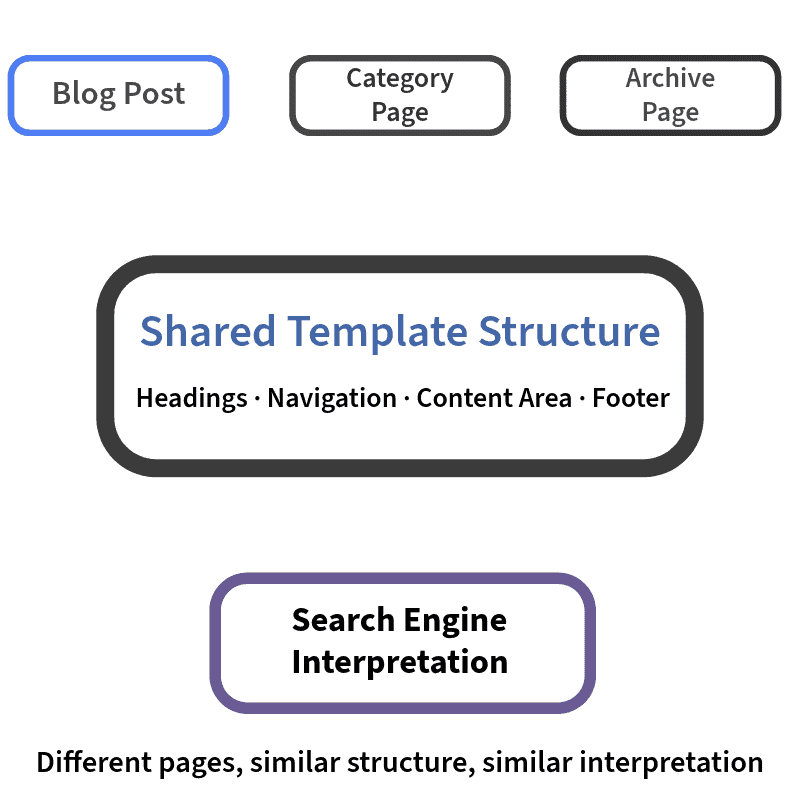
Most WordPress pages are created using templates. Templates define the structure of a page, including where content appears, how navigation is repeated, and how information is arranged.
While pages may look different visually, search engines often interpret them as variations of the same underlying structure.
This distinction matters because search engines interpret structure first, but also evaluate design function as part of how a page is assessed.
How shared templates affect page identity
Many WordPress pages are built from the same underlying template.
A blog post, a category page, and an archive page may share similar layouts, headings, navigation elements, and internal links.
From a search engine’s perspective, this shared structure can make different pages appear closely related, even when the visible content changes.
When many pages rely on the same template, their identity is shaped more by structure than by individual differences.
This is why WordPress sites can contain pages that feel unique to users but express the same document role through a shared layout structure.
Why pages appear identical to search engines
Search engines prioritise consistency and patterns when interpreting pages.
If multiple pages share the same layout, headings, linking patterns, and repeated elements, search engines may treat them as structurally similar documents.
This does not mean the content is ignored. It means structure provides strong signals about how pages should be grouped, compared, and evaluated relative to one another.
When structural similarity is high, pages may be interpreted as serving the same purpose, but consistent templates also help search engines understand site structure at scale.
How page structure affects meaning
Search engines analyse the rendered page structure rather than the editing interface.
They evaluate the final page as it appears in code, including headings, sections, links, and repeated elements.
If important content is surrounded by large amounts of repeated structure, its relative importance can be reduced.
Clear and consistent structure, by contrast, helps search engines understand what a page is about and how it differs from others.
In this context, structure influences meaning before content is fully evaluated.
Why do different pages sometimes rank the same way?
Because search engines may interpret them as structurally similar documents serving a similar role on the site.
How WordPress Resolves Duplicate and Related URLs
WordPress uses canonical signals to suggest preferred URLs, not enforce them.
When multiple pages appear similar, search engines rely on signals to understand how those pages relate to each other.
In WordPress, these relationships are communicated through structural cues and signals that suggest which version of a page should be treated as the primary one.
These signals do not remove pages or prevent them from existing. Instead, they help search engines understand how pages connect, overlap, or repeat information across the site.
Why canonicals are signals, not rules
WordPress can suggest a preferred version of a page, but search engines are not required to follow that suggestion.
Canonical signals indicate which URL is intended to represent a group of similar or related pages.
They are advisory rather than absolute instructions.
Search engines evaluate these signals alongside other factors, such as internal linking, page structure, and site-wide consistency.
When signals conflict or appear unreliable, search engines may choose a different interpretation.
This is why duplication-related outcomes are often based on signal trust rather than technical failure.
What happens when canonical signals conflict
Conflicting signals make it harder for search engines to understand page relationships.
In WordPress, signals can originate from multiple parts of the system, including the platform itself and additional layers that modify how pages are presented.
When different parts of the system suggest different preferred versions, search engines receive mixed messages.
Over time, this can reduce confidence in any single signal and lead search engines to rely more heavily on their own interpretation.
This does not usually cause immediate problems. It introduces uncertainty that accumulates gradually.
When search engines ignore canonical intent
Search engines may ignore canonical signals when they are inconsistent or unsupported by structure.
If pages continue to appear similar, are equally linked internally, or seem interchangeable, signals intended to clarify relationships can lose effectiveness.
In these cases, search engines may treat pages as separate but competing documents, even when the site owner intended them to be consolidated.
Relationship resolution depends on signal clarity and consistent structural context.
Do canonical signals always prevent duplication issues?
No. They help explain intent, but search engines still evaluate consistency and structure before trusting them.
How Archives, Pagination, and Taxonomies Expand the Site
WordPress generates archive and paginated URLs that expand the index beyond published pages.
Even when individual pages are understood and related correctly, additional pages are generated through WordPress’s structure.
These pages are not created by writing new content, but by organising existing content into lists, groupings, and sequences.
This structural expansion happens automatically and often goes unnoticed as a site grows.
Why archive pages act like content
Archive pages collect existing content and present it as a separate page.
Category pages, tag pages, author pages, and date archives all list posts that already exist elsewhere on the site.
To a search engine, these archive pages appear as standalone documents. They have their own URLs, headings, internal links, and navigation.
Even though they do not introduce new information, they still participate fully in search evaluation.
As a result, archive pages can compete with primary content for attention, relevance, and internal signals.
How pagination creates additional documents
Pagination divides long lists into multiple pages, each with its own URL.
When archives or listings grow beyond a certain size, WordPress automatically creates paginated pages to manage display.
Each paginated page can be crawled and evaluated independently, even when the content it lists has already been indexed elsewhere.
Over time, pagination can significantly increase the number of pages search engines encounter, even when the underlying content has not changed.
This becomes a risk factor when structurally generated pages are indexed without supporting the site’s primary topics or offering distinct value.
How taxonomies spread relevance thin
Taxonomies organise content, but they also distribute relevance across multiple pages.
When posts are assigned to several categories or tags, their topical signals are shared across many archive pages.
From a search engine’s perspective, this can make it harder to determine which pages represent the core subject of the site.
Relevance becomes distributed rather than concentrated.
This effect increases as more taxonomies are added and reused over time.
Are archive pages bad for SEO?
No. They become a risk when they are indexed without supporting clear topical intent.
How SEO Automation Changes Technical Control
Automation in WordPress delegates SEO decisions away from direct human control.
As WordPress sites grow in size and structure, many technical decisions shift from manual control to automation.
Automation helps manage complexity at scale, but it also changes how visibility and accountability work within the system.
In WordPress, automation rarely replaces human intent. Instead, it repeatedly and consistently executes predefined rules. Over time, this can distance site owners from the direct cause-and-effect relationship between changes made and the outcomes they observe.
What automation controls in WordPress
Automation handles recurring technical decisions that would otherwise require constant manual oversight.
These include how pages are described, how structures are generated, and how signals are applied across large numbers of URLs.
Because these processes operate continuously, they shape a site’s technical behaviour long after individual decisions are made.
This can help maintain consistency, but it also means small configuration choices are applied everywhere.
In this context, automation scales decisions rather than replaces them.
Why automation reduces visibility
Automated systems can change behaviour without making those changes immediately obvious.
When outcomes shift, it is not always clear which rule or process caused the change, especially when multiple automated layers are involved.
This reduced visibility can make it harder to understand why certain pages behave differently over time.
Issues may appear gradually rather than suddenly, and their origins may not be immediately clear.
Loss of visibility does not mean loss of control, but it does mean control requires greater awareness.
How updates change behaviour over time
Automation evolves as WordPress and its supporting systems evolve.
Updates to the platform, themes, or related components can alter how automated rules behave, even when no deliberate changes are made by the site owner.
These shifts can subtly change how pages are generated, structured, or interpreted by search engines.
Because they occur within existing systems, they are often noticed only after outcomes change.
Over time, this creates behavioural drift rather than immediate disruption.
Is automation always a problem?
No. Automation becomes a risk when its effects are not clearly understood or consistently governed.
Why Performance Issues Are System Symptoms
Performance in WordPress reflects cumulative system complexity, not a single issue.
Page speed, responsiveness, and loading behaviour are outcomes of many decisions interacting over time, not the result of one missing adjustment.
Search engines measure performance to understand user experience. What those measurements reveal, however, is often deeper than speed alone.
In WordPress, performance tends to surface the combined effects of structure, automation, and execution.
How WordPress execution affects speed
Every page request in WordPress follows a defined execution path.
When a page is loaded, WordPress processes templates, retrieves content, applies rules, and assembles the final page before delivering it.
As sites grow, this process can become more complex.
Additional features, structural layers, and automated behaviour increase the amount of work required for each page request.
The result is not only slower pages, but greater variation in how pages perform.
This variation signals an increase in processing overhead and request complexity rather than surface inefficiency.
Why slow responses signal deeper issues
Slow server responses often indicate structural or execution limits rather than surface-level problems.
When delays occur before a page begins to load, it usually means the system is working harder to assemble the page.
In WordPress, this effort can be influenced by how content is organised, how templates are reused, and how automated processes are applied.
Performance measurements capture these effects indirectly, which makes them useful indicators of overall system health.
Speed, in this context, reflects how smoothly the platform operates under load.
How features accumulate performance cost
Performance impact is cumulative rather than immediate.
Each additional feature, structural layer, or automated rule adds a small amount of processing overhead.
Individually, these additions may seem insignificant.
Over time, they combine.
The system becomes heavier, more complex, and less predictable in how it responds to requests.
Performance issues, therefore tend to appear gradually rather than suddenly.
This explains why performance problems often emerge later in a site’s lifecycle, even when nothing appears to have changed recently.
Is site speed just about optimisation?
No. It reflects system structure and execution complexity, not just frontend optimisation.
How Hosting Limits WordPress SEO Reliability
Hosting defines the upper performance and crawl reliability limits of WordPress sites.
Every WordPress site operates within the constraints of its hosting environment.
No matter how well a site is structured or managed, hosting sets boundaries on how reliably the platform can respond to search engines and users.
These limits are not based on brand or perceived quality. They relate to capacity, consistency, and how resources are allocated and shared.
Why infrastructure sets performance ceilings
Hosting determines the maximum level of performance a WordPress site can sustain.
It defines how quickly pages can be processed, how many requests can be handled at the same time, and how consistently responses are delivered.
As a site approaches these limits, improvements elsewhere tend to produce diminishing returns.
Pages may still load, but variability increases.
Search engines may encounter slower or less predictable responses, even when nothing has changed at the content level.
This is why hosting is best understood as a ceiling rather than an optimisation lever.
How shared resources affect consistency
Many WordPress sites operate in environments where resources are shared.
When multiple sites rely on the same underlying infrastructure, performance can fluctuate depending on overall demand.
From a search engine’s perspective, this fluctuation appears as inconsistency.
Some requests are handled quickly, while others take longer. Over time, this variability affects how reliably pages are crawled and evaluated.
Consistency matters because search engines value predictable behaviour.
Where responsibility boundaries sit
Not all technical behaviour is controlled by WordPress itself.
Some aspects of performance and reliability are determined by the hosting environment, while others are influenced by how WordPress is configured and structured.
Understanding these boundaries helps explain why certain issues persist despite internal changes.
It also clarifies which problems are structural and which are environmental.
Clear boundaries prevent misplaced expectations and improve problem diagnosis.
Can good SEO overcome poor hosting?
No. Hosting sets constraints that optimisation cannot fully bypass.
How Technical Debt Builds Up in WordPress Over Time
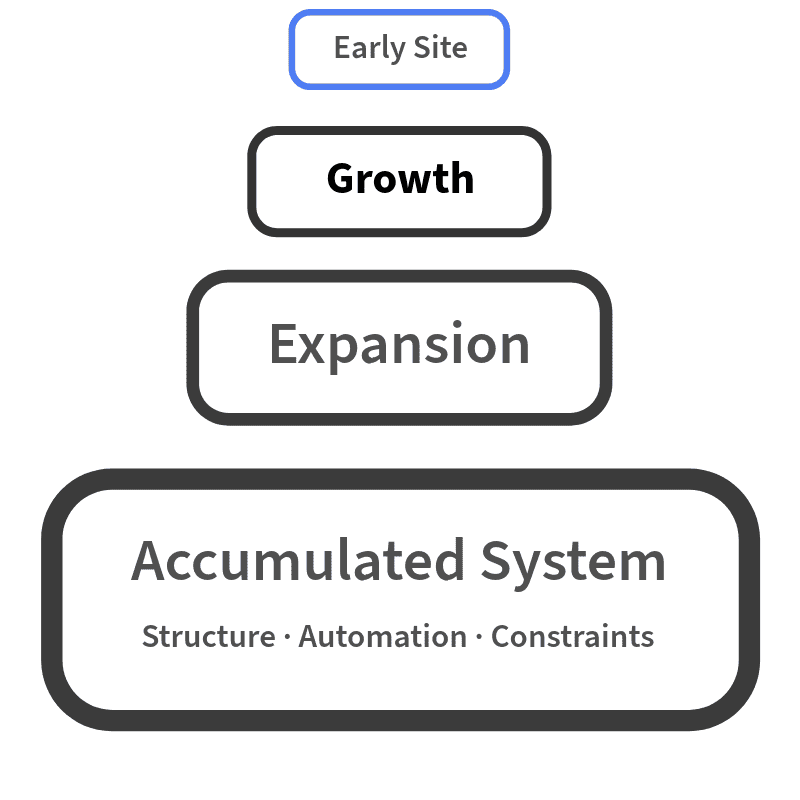
Technical debt in WordPress accumulates as small structural decisions compound over time.
It is not caused by a single mistake or moment, but by the gradual interaction of exposure, indexation, structure, automation, performance limits, and governance over time.
This is why technical SEO issues often reappear even after changes are made.
The system retains the effects of past decisions.
How small decisions compound
Most technical debt begins with reasonable choices made at the time.
Adding categories, expanding content types, introducing automation, or adjusting structure often addresses an immediate need.
As a site grows, those decisions are repeated, extended, or layered on top of each other. Each choice adds a small amount of complexity.
Individually, these additions feel manageable.
Collectively, they change how the system behaves.
Over time, the site becomes harder to interpret, adjust, and stabilise without understanding how those decisions connect.
Why ownership ambiguity causes issues
WordPress sites are often shaped by multiple roles over time.
Content teams publish, developers adjust structure, marketing teams introduce automation, and hosting environments evolve.
When responsibility for technical behaviour is unclear or fragmented, decisions are made in isolation.
No single change appears problematic, but the system gradually loses coherence.
This ambiguity makes it difficult to determine why issues persist or where corrective action should begin.
How WordPress retains past decisions
WordPress does not reset itself as a site evolves.
Old structures, archived URLs, historical indexation signals, and automated rules continue to influence behaviour long after their original purpose has passed.
These retained behaviours are typically surfaced through a Structured SEO audit, which evaluates how historical structure, indexation, and system decisions continue to influence current search performance.
Search engines encounter this history through links, structure, and repeated patterns.
As a result, past decisions continue to shape how the site is understood, even when priorities change.
Technical debt is not limited to current configuration. It reflects the system’s retained behaviours and legacy interactions.
Why do SEO issues return after fixes?
Because the system behaviours that caused them were not fully understood or consistently governed.