
WordPress SEO: Understanding, Optimising, and Scaling Search Visibility
WordPress SEO is the process of helping WordPress websites show up clearly in search engines. It depends on how the site is built, how content is organised, how pages link together, and how fast and accessible the site is.
WordPress offers flexibility, but strong search visibility comes from how it’s applied.
Internal linking, crawl behaviour, indexation signals, and site performance all influence how clearly a WordPress site communicates its purpose and relevance. When these elements align, WordPress provides a dependable foundation for sustainable search visibility, even in competitive markets.
Optimising WordPress for search is not a single action. It’s a system of ongoing control and clarification.
Themes, plugins, and content types introduce possibilities, but also complexity.
Site architecture, taxonomy usage, crawl control, and performance management all affect how search engines interpret relevance, trust, and consistency.
Effective SEO improves clarity by making the site work together as a whole, rather than adding more tools.
This page is for site owners, marketers, and evaluators who need to understand WordPress SEO at a system level before taking action. It explains how WordPress behaves by default, where visibility commonly breaks down, and how optimisation reinforces long-term stability. The focus is on understanding before execution and clarity before change.
This guide covers:
- How search engines interpret WordPress sites in real conditions
- Where WordPress structure and templates support visibility
- How content, internal links, and performance interact semantically
- Why crawl control and visibility settings shape indexation outcomes
- When WordPress SEO evolves from configuration into strategic governance
The goal is simple:
To make WordPress SEO understandable as a system, so decisions about search performance are informed, deliberate, and repeatable.
Table of Contents
- What WordPress SEO Actually Is (and What It Isn’t)
- Core WordPress SEO Foundations You Need in Place
- How Search Engines Crawl and Index WordPress Sites
- Content, Templates, and On-Page SEO in WordPress
- Optimising WordPress SEO Beyond Plugins
- Evaluating AI and Automation in WordPress SEO
- Scaling Search Visibility with WordPress SEO
- Frequently Asked Questions
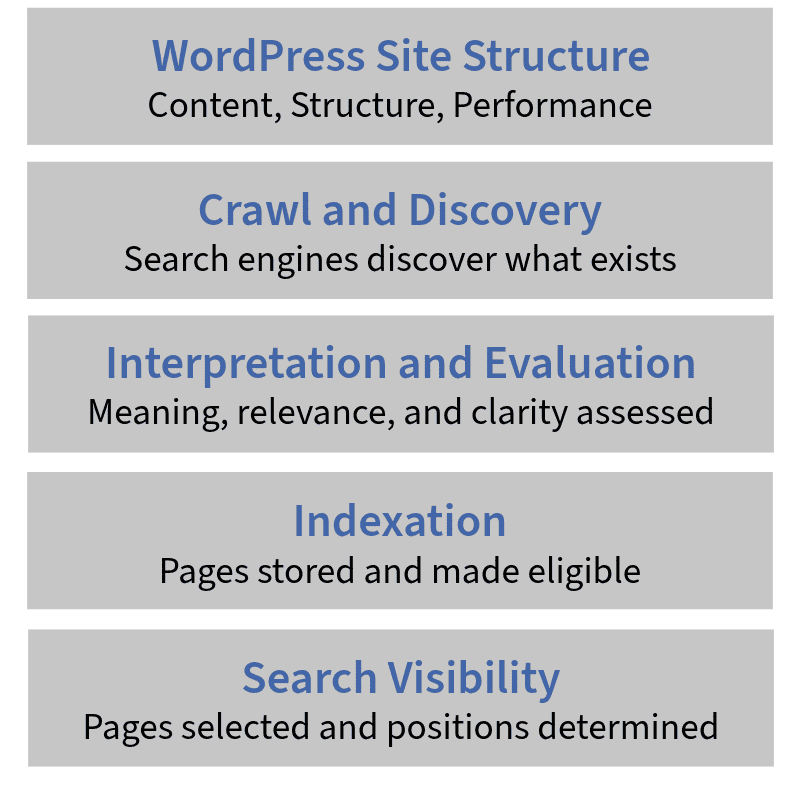
What WordPress SEO Actually Is (and What It Isn’t)
WordPress SEO refers to how effectively a WordPress site applies search fundamentals so search engines can interpret and reward it.
WordPress provides a flexible publishing framework. Search visibility depends on how clearly the site is structured, how consistently its key elements are configured, and how reliably those decisions are maintained.
By default, WordPress produces indexable pages, generates URLs through permalink settings, and allows content to be published quickly.
These behaviours make content accessible to search engines. But accessibility does not guarantee search performance.
Search engines evaluate structure, clarity, and intent.
These signals emerge from how templates are built, how content is grouped, and how internal links reinforce meaning.
WordPress SEO reflects the relationship between how the system behaves and how well it is implemented.
A site with clear structure and consistent patterns communicates its purpose predictably.
A disorganised site introduces duplication, crawl issues, and unclear signals. The outcome depends on how the platform is used.
WordPress is often called “SEO-friendly” because of its defaults and plugins.
In real terms, it behaves as a flexible system. That flexibility can support strong visibility when structure, content, and control layers align. It can also introduce friction when they conflict.
SEO work on WordPress is about reducing confusion and reinforcing meaning across the site, not enabling features.
Understanding WordPress SEO means knowing how the platform behaves by default, where those behaviours limit visibility, and how optimisation improves clarity for both users and search engines.
What WordPress SEO Means in Practice
In practical terms, WordPress SEO is shaped by how the platform outputs and connects content.
It generates URLs from permalink settings, renders pages through templates, and creates archive pages using taxonomies like categories and tags.
Search engines don’t see post types, they evaluate rendered HTML, internal links, and contextual signals.
Templates define how metadata, headings, and layout elements appear.
Taxonomies influence how content is grouped and found.
Internal links determine whether pages support a topic or compete against each other.
When these systems align, search engines interpret relevance more clearly. When they conflict, signals become harder to trust.
Crawl control also plays a key role. Indexation settings, canonical references, pagination behaviour, and archive duplication all influence how efficiently search engines process a site.
Performance matters too. Slow rendering, bloated scripts, and unstable layouts affect both usability and crawlability.
Effective WordPress SEO ensures every page has a defined role, a logical relationship to others, and a valid reason to exist in the index.
Common Misconceptions About WordPress SEO
Misconception 1: Installing an SEO plugin completes the work.
Plugins make it easier to set titles, descriptions, canonicals, and structured data. But those settings only work well when the site’s structure supports them. Clear navigation, consistent templates, and logical linking decide whether those controls improve visibility, or create mixed signals.
Misconception 2: Content alone drives rankings.
Strong content is essential, but search engines evaluate it in context. Internal links, taxonomy design, and crawl efficiency all shape how that content is understood and ranked.
Misconception 3: WordPress is SEO-friendly by default.
The platform allows for optimisation, but it doesn’t apply it. Publishing is easy, but search readiness requires deliberate setup, including visibility settings, archive control, and performance tuning.
These beliefs persist because SEO is often seen as a set of tools. In reality, WordPress SEO works when content, structure, and system behaviour all support each other.
Is WordPress SEO just about installing a plugin?
No. SEO plugins give access to important controls, but search performance depends on how the whole system is structured, from templates and links to indexation and content depth. Plugins support SEO. They don’t define it.
Core WordPress SEO Foundations You Need in Place
WordPress SEO performance is constrained or enabled by a small set of foundational conditions. These are not advanced tactics. They are baseline requirements that determine whether search engines can reliably access, interpret, and trust a site.
When these foundations are weak, no amount of content or tooling compensates for the loss of clarity.
This layer of WordPress SEO is diagnostic in nature. It answers a simple question: is the platform configured in a way that allows search visibility to scale without friction? If the answer is no, optimisation efforts tend to stall or decay over time.
Core foundations include visibility controls, URL logic, protocol consistency, mobile readiness, and theme quality.
Each affects how search engines crawl the site, how signals consolidate, and how stable rankings remain as content grows.
These elements do not generate rankings directly. They determine whether rankings are sustainable.
WordPress makes it easy to publish content. It does not ensure that content is discoverable, consolidated, or interpreted consistently. That responsibility sits at the foundation level. Sites that establish these controls early avoid compounding issues. Sites that ignore them often inherit technical debt that becomes harder to unwind as the site expands.
A strong WordPress SEO foundation does not make a site competitive on its own. It removes barriers that prevent competitiveness. Without it, search performance becomes fragile, unpredictable, and expensive to maintain.
At this stage, many of these constraints are no longer specific to WordPress alone.
Crawl efficiency, indexation control, URL consolidation, and performance limits are governed by broader Technical SEO principles that apply across platforms.
WordPress simply exposes them more visibly as sites scale.
Indexability and Visibility Settings
One of the most common WordPress SEO failures is accidental invisibility.
WordPress includes visibility controls designed for development and staging environments. When misapplied, they prevent search engines from indexing the site entirely or partially.
The most direct example is the “Discourage search engines from indexing this site” setting. When enabled, it sends a site-wide signal that blocks indexation. This setting is often left active after launch or re-enabled during redesigns.
In other cases, staging environments leak into production through shared configurations, creating inconsistent indexation signals.
Indexability issues also arise through unintended noindex directives, blocked resources, or plugin conflicts.
Search engines may still crawl the site, but pages fail to enter or remain in the index. These problems are easy to overlook because the site appears functional to users.
Visibility settings define whether SEO is even possible. If search engines cannot reliably index pages, optimisation efforts operate on an unstable surface.
Verifying indexability is therefore a prerequisite, not an optimisation step.
URL Structure, HTTPS, and Canonical Consistency
Search engines rely on URL consistency to consolidate signals. WordPress sites frequently introduce ambiguity through inconsistent permalink structures, protocol mismatches, and competing URL versions.
Permalink settings control how URLs are generated across posts, pages, and archives. Poorly chosen structures create long, parameter-heavy URLs or introduce unnecessary duplication.
Decisions made here affect every future page.
Protocol consistency is equally critical. HTTPS should be enforced across the entire site, with a single preferred version of the domain.
Mixing HTTP and HTTPS, or allowing both www and non-www versions to resolve, splits authority and confuses canonical interpretation.
Trailing slashes, pagination, and archive URLs further complicate consolidation.
Canonical signals help search engines understand which version of a page should rank, but they only work when the underlying structure is coherent.
A clean WordPress SEO setup produces one clear URL for each piece of content. Everything else should resolve, redirect, or consolidate toward that version.
Theme and Mobile Readiness
Themes play a decisive role in WordPress SEO because they control how content is rendered, structured, and delivered. Search engines evaluate what users receive, not what the CMS intends.
A well-built theme produces clean markup, logical heading structures, and accessible navigation. A poorly built theme introduces excessive wrappers, script dependencies, and unstable layouts.
These issues increase crawl complexity and reduce interpretability.
Mobile readiness is now inseparable from SEO evaluation.
Responsive design alone is not enough. Themes must support fast rendering, stable layouts, and accessible interactions on mobile devices.
Poor mobile performance weakens engagement signals and increases crawl cost.
Theme quality does not determine rankings directly. It determines whether content and structure can be evaluated efficiently.
In WordPress SEO, the theme is part of the system, rather than a cosmetic choice.
WordPress have built-in SEO?
Yes, in part. WordPress includes baseline crawlability and publishing features, but it does not provide optimisation by default. Competitive SEO requires deliberate configuration, structural clarity, and ongoing control beyond core platform settings.
How Search Engines Crawl and Index WordPress Sites
Search engines interact with WordPress sites through three distinct processes: crawling, indexation, and ranking.
These steps are often grouped together, but each serves a different purpose and responds to different system signals.
WordPress SEO performance depends on how well the platform supports each stage without introducing friction or ambiguity.
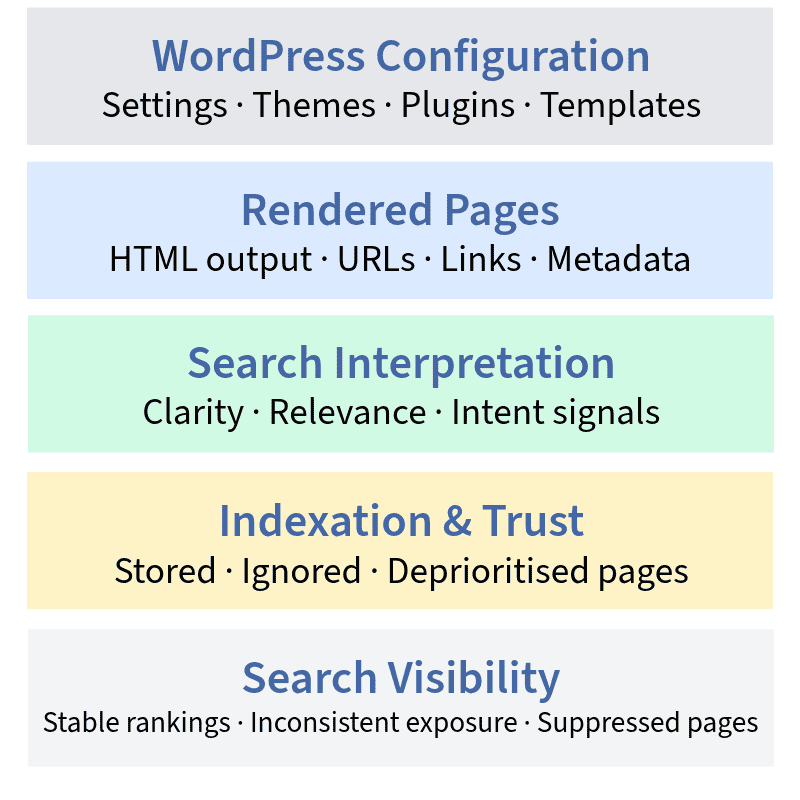
Crawling is the discovery process
Search engines request URLs, follow internal links, and collect content.
WordPress influences this through navigation structure, archive generation, pagination, and XML sitemaps.
When these systems produce excessive or repetitive URLs, crawl efficiency declines and priority pages may be missed.
Indexation is the evaluation phase
Once a page is crawled, search engines decide whether to store it in one of their indexes.
WordPress affects this through canonical tags, noindex settings, duplicate templates, and taxonomy usage.
Pages without a distinct purpose, or that closely resemble others, often remain excluded or are indexed with reduced weight.
Ranking is the competitive layer
Indexed pages are compared to others based on relevance, quality, authority, and usability.
WordPress does not control ranking factors directly, but it strongly influences how clearly relevance and intent are expressed.
Structural ambiguity earlier in the pipeline can suppress performance here.
Understanding how WordPress interacts with each phase helps explain why strong content sometimes underperforms.
The issue is rarely “SEO” in the abstract. It is how crawl paths, indexation criteria, and interpretive clarity are shaped by system outputs.
Crawling vs Indexation vs Ranking in WordPress
Crawling, indexation, and ranking form a sequence but each responds to different signals and constraints.
Crawling determines whether search engines can find and access content efficiently.
In WordPress, crawl behaviour is shaped by internal linking, archive pages, pagination structures, and XML sitemaps. Uncontrolled taxonomies or infinite URL variations increase crawl demand without adding meaningful value.
Indexation determines whether a discovered page is stored in the search engine’s indexes.
WordPress influences this through canonical settings, visibility directives, and content duplication.
Pages that repeat templates, create thin archives, or share near-identical content often fail to secure lasting index presence.
Ranking occurs only after a page is indexed. It compares that page against others based on relevance and authority.
WordPress contributes by shaping how clearly a page communicates intent, how well it’s supported by internal links, and how reliably it performs for users.
A WordPress site can be crawlable without being indexable, and indexable without ranking.
Effective SEO ensures all three stages work together, not in isolation.
XML Sitemaps and Robots.txt in WordPress
XML sitemaps help search engines discover URLs, especially those not linked in navigation.
They do not control ranking or guarantee indexation.
WordPress typically generates sitemaps via plugins or core functionality, both of which can include unintended content.
Well-managed sitemaps prioritise useful pages and reinforce site structure.
Poorly managed ones often include thin archives, tracking parameters, or URLs that duplicate existing content.
This creates noise in the crawl process and dilutes discovery efficiency.
Robots.txt governs crawler access, not indexation outcomes.
It can prevent crawling, but cannot remove a page from the index once discovered.
In WordPress, this file is often misunderstood or altered by plugins, leading to blocked resources or partial site visibility.
Sitemaps and robots.txt work best when they support the same intent. When they conflict, search engines rely on actual crawl behaviour rather than stated rules.
Managing Taxonomies, Archives, and Pagination
WordPress automatically generates category pages, tag archives, date archives, author listings, and paginated views.
These structures improve navigation, but if left unmanaged, they generate excess pages that reduce crawl focus and fragment semantic meaning.
Taxonomy bloat occurs when categories and tags are created freely without serving distinct purposes. Each taxonomy term becomes an indexable page that can dilute topic relevance or duplicate other content.
Date archives and author pages add further duplication, especially when they repeat the same post listings found on category or homepage URLs.
Pagination also introduces risk. Without contextual linking or canonical guidance, paginated series can spread content value across many thin pages instead of consolidating it.
Managing these systems is not about removal, it’s about intent. Every indexable page should serve a clear, unique role within the site’s topical structure.
If a page is in the XML sitemap, will it rank?
No. XML sitemaps assist with discovery, not prioritisation or rankings. A page must still be crawled, indexed, evaluated for relevance, and supported by internal context before it can perform competitively.
Content, Templates, and On-Page SEO in WordPress
In WordPress, on-page SEO is shaped by more than content quality. It depends on how content is rendered, framed, and connected across the site.
Search engines evaluate what is delivered to users, not what sits in the editor. The same content can perform differently depending on how templates define structure, metadata, and surrounding context.
Templates act as signal amplifiers. They control how titles are placed, how headings are nested, how metadata is exposed, and how supporting elements like breadcrumbs or related content appear.
When templates are consistent and lean, they reinforce meaning. When bloated or inconsistent, they obscure it.
WordPress often surfaces the same content in multiple contexts, such as category pages, tag archives, author listings, and date-based views.
Each context generates a unique URL that search engines evaluate separately.
On-page SEO in WordPress extends beyond the post itself. It includes how content behaves across the site.
Effective optimisation ensures that content meaning stays consistent no matter where it appears.
Templates, internal linking, and page hierarchy must align to avoid signal dilution and internal competition.
Without this coherence, even high-quality content may struggle to perform.
Templates vs Content: Where SEO Signals Are Won or Lost
Content defines relevance. Templates determine how clearly that relevance is communicated.
Search engines rely on structure to interpret meaning, and structure is delivered by templates.
Templates control how headings are ordered, where titles appear, how metadata is handled, and how internal links are positioned.
A well-written post wrapped in a disorganised template can lose its impact. A strong template amplifies content by presenting it cleanly and predictably.
Issues arise when templates include multiple H1s, bury main content under menus or ads, or recycle identical metadata across large sections.
These patterns introduce doubt about what the page is for.
In WordPress, SEO signals are strengthened when templates reinforce clarity. They weaken when design choices interfere with structure or repeat information unnecessarily.
Internal Linking Through Categories, Tags, and Menus
Internal links guide both users and search engines.
In WordPress, these links come from categories, tags, menus, breadcrumbs, and in-body connections, all of which shape how content relationships are understood.
Categories are best used to define major topics.
Tags can clarify subtopics, but when overused, they generate shallow archive pages that compete with more focused content.
Menus and breadcrumbs add another structural layer by signalling hierarchy and importance.
Internal linking affects how authority flows and how topics are reinforced.
When pages are consistently connected, search engines see a deliberate structure. When links are scattered or excessive, those signals become hard to trust.
SEO improves when internal links mirror editorial intent.
Pages should support each other with purpose, not exist in too many loosely defined contexts.
Author Pages, Media Pages, and Thin URLs
WordPress automatically creates URLs for content types that may not be intended for search. These include author archives, media attachment pages, and thin tag or date-based archives.
Some of these can be useful. Author pages may support trust and attribution. Media pages can be valuable if they include descriptions or context.
But in many cases, they exist only because WordPress generates them.
These thin URLs add noise to the index.
They consume crawl resources, fragment authority, and dilute clarity.
Managing them means deciding what should be improved, merged, or excluded from indexation.
SEO in WordPress is not about having more pages. It’s about ensuring every indexed page has a clear role and adds value to interpretation.
Are categories and tags good or bad for WordPress SEO?
Categories and tags help when they are limited, intentional, and tied to meaningful topics. When auto-generated, shallow, or excessive, they create duplicate surfaces that confuse search engines and weaken topical clarity.
Optimising WordPress SEO Beyond Plugins
SEO plugins are a visible part of WordPress, but they do not define optimisation.
They expose important controls, not strategic intent.
Long-term SEO performance depends on how decisions are made, evaluated, and maintained across the system, not which tools are installed.
Plugins give access to metadata fields, indexation settings, schema outputs, and sitemap generation.
These are useful capabilities, but they are neutral by design.
A plugin cannot decide whether a taxonomy should exist, whether a page serves a purpose, or whether internal links reinforce meaning.
These decisions sit above the tool layer.
WordPress SEO matures when the focus shifts from configuration to governance. That shift recognises that performance, structure, and relevance degrade unless actively managed.
Plugins assist execution. They do not prevent decay.
Beyond plugins, optimisation means building coherence.
It involves evaluating how content is prioritised, how templates evolve, how performance limits affect crawl behaviour, and how automation is guided.
This is the point where WordPress SEO becomes stable and scalable, not just adjustable.
What Plugins Can and Cannot Do
SEO plugins work at the control layer. They allow site-wide management of titles, descriptions, canonical URLs, structured data, and indexation settings.
They also generate XML sitemaps and flag missing or duplicated fields.
What they do not do is understand context.
Plugins cannot assess topical hierarchy, business priorities, or content overlap.
They do not choose which archive pages are useful, which templates are redundant, or when consolidation is needed.
Plugins reflect the structure they’re given.
If a site produces excessive archives, thin content, or disjointed templates, the plugin will expose those outputs faithfully.
In that sense, plugins can amplify problems as easily as they support clarity.
Effective WordPress SEO uses plugins as instruments. Their value depends on how consistently and selectively their controls are applied.
Performance, Core Web Vitals, and Hosting Constraints
Performance is not an enhancement layer. It’s a limiting factor.
Slow rendering, layout instability, and delayed interaction reduce crawl efficiency and undermine trust signals.
These effects compound as a WordPress site scales.
Core Web Vitals measure real user experience, but their causes often sit outside WordPress. Hosting, caching, database efficiency, and server response times all affect performance.
Themes and plugins add complexity through scripts, fonts, and third-party assets.
Optimisation here means reducing friction, not chasing scores. Stable layouts, clean rendering paths, and efficient delivery help both users and search engines process content with less resistance.
In WordPress SEO, performance shapes crawl behaviour and ranking confidence. It is foundational, not optional.
Internal Governance Over Automation
Automation offers scale, bulk rules, auto-generated schema, and dynamic metadata.
But without oversight, it introduces drift.
As content grows, automated decisions multiply. Tags expand, templates evolve, and internal links shift. Over time, the site’s structure can diverge from its intent if no one is steering.
Governance corrects this drift. It ensures automation supports strategy, reinforces existing themes, and prevents the accumulation of low-value pages.
WordPress SEO is not about avoiding automation. It’s about guiding it.
Strong performance comes from automation with accountability.
Which SEO plugin is best for WordPress?
There is no universal “best” plugin. The right tool depends on how much control the site needs, how complex its structure is, and how consistently decisions are applied. Plugins support SEO, rather than define it.
Evaluating AI and Automation in WordPress SEO
AI and automation tools are now common in WordPress SEO workflows. They help speed up tasks like content creation, metadata handling, and schema generation.
When used carefully, they improve consistency and reduce manual effort. When left unsupervised, they create duplication, thin content, and structural drift.
The issue is not what AI can do. It’s what it doesn’t understand. AI doesn’t evaluate intent, relevance, or competitive positioning.
It follows patterns, not priorities. WordPress sites using AI at scale often introduce noise faster than they improve clarity.
Automation should support human decisions. It doesn’t replace them.
WordPress SEO still relies on reviewing what gets published, how it connects, and whether it adds value.
Used well, automation reinforces structure. Used poorly, it hides problems until they scale.
AI Content Generation and Quality Thresholds
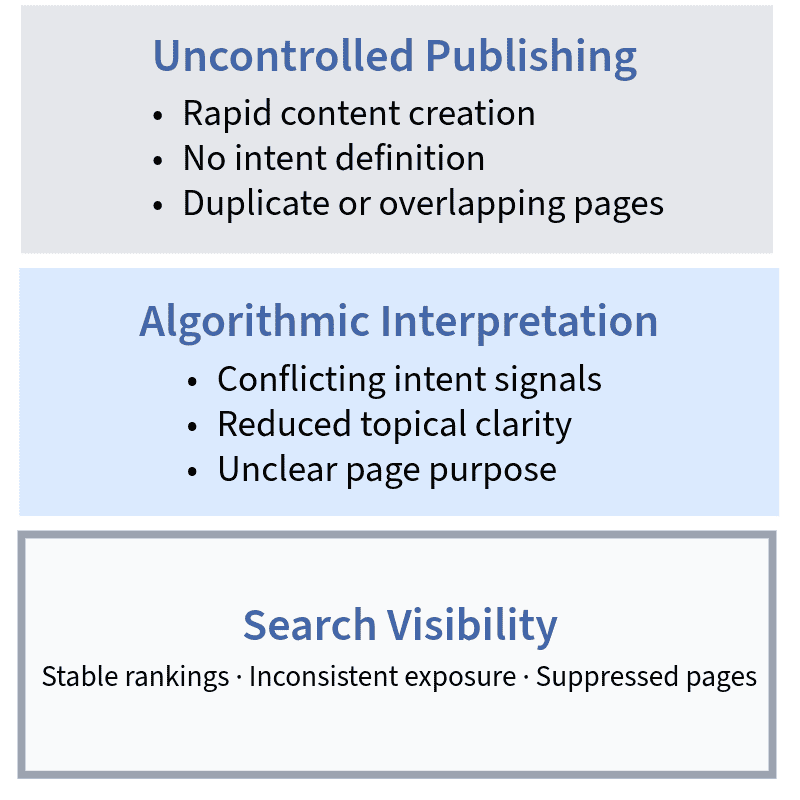
AI speeds up content creation, but volume without clarity adds risk.
WordPress already allows content to be published quickly. AI adds another layer of scale and potential duplication.
Search engines assess usefulness, not just readability.
AI-written content may sound right, but miss context or depth. When too many similar pages are created, the site’s structure becomes unclear.
AI can be part of content workflows when intent is set first. Content still needs review, editing, and a clear purpose.
Without this, AI can become a source of noise rather than value.
Automation in Internal Linking, Schema, and Metadata
Automation is useful for repeatable tasks. In WordPress, that includes templated metadata, schema output, and suggested internal links.
When set up correctly, these systems improve consistency.
Problems start when automation overrides strategy.
Links can point to irrelevant pages.
Schema can misstate meaning.
Metadata can flatten signals.
Automation works best when it reflects a plan. Not when it replaces one.
Can AI tools replace WordPress SEO expertise?
No. AI supports execution but cannot make strategic decisions. SEO performance still depends on human evaluation, editorial judgment, and system-level control.
Scaling Search Visibility with WordPress SEO
Scaling WordPress SEO isn’t about creating more content but maintaining clarity as the site grows.
When structure breaks down, even large sites lose visibility.
WordPress is built for scale. It supports internal linking, template-based publishing, and taxonomy systems. But these strengths only help when they’re managed with intent.
Without ongoing structure, content starts to compete with itself instead of building authority.
Scaling visibility means managing topics, reinforcing priority pages, and removing pages that no longer help. It’s about keeping the system coherent as it grows.
When WordPress SEO is managed well, visibility grows with stability. When it’s not, content growth increases complexity without adding value.
Topical Authority and Internal Link Systems
Topical authority comes from coverage and connection.
WordPress sites build this by linking related pages and grouping them clearly using categories and cornerstone pages.
Internal links signal relationships. Pages that connect around a theme are seen as more relevant to that topic. Over time, this improves ranking confidence.
Weak linking sends mixed signals.
Pages get buried or compete with each other.
Authority spreads too thin to make an impact.
Effective WordPress SEO links pages intentionally. It shows which content leads and how supporting content fits.
That’s how relevance becomes stable at scale.
As competition increases, WordPress SEO shifts from configuration to authority management. This is especially visible in broader markets, where National SEO requires stronger internal linking systems, cleaner consolidation, and stricter governance to maintain visibility at scale.
Preventing Cannibalisation and Content Decay
As WordPress sites grow, overlapping content becomes common.
Similar pages target the same keywords, split links, and confuse search engines.
This is cannibalisation and weakens all affected pages.
Content decay is different but related.
Older pages lose performance as topics change.
Newer content pushes them aside, but they stay indexed, draining value.
Both issues need clean-up.
Similar pages should be merged or clarified.
Outdated ones should be updated or removed.
Scaling SEO means knowing when to cut, not just when to add. Fewer, stronger pages outperform scattered ones.
Monitoring, Audits, and Long-Term Stability
WordPress sites change constantly. New content, plugin updates, theme changes all affect how search engines see the site.
Monitoring helps catch issues early.
Audits explain what’s happening.
Regular checks stop technical drift and keep structure aligned with goals.
Audits aren’t just for fixing problems. They’re for checking direction.
They show whether the system still reflects what the site is trying to achieve.
Long-term SEO success in WordPress comes from control.
Not one-time fixes, ongoing checks that keep the system healthy.
When does WordPress SEO require specialist input?
When the site grows fast, competition increases, or technical issues start stacking up. At that point, strategy, structure, and oversight need expert attention.
Frequently Asked Questions About WordPress SEO
Is WordPress still good for SEO in competitive industries?
Yes. WordPress performs well in competitive environments when site structure, content depth, and technical stability are actively managed.
How long does WordPress SEO take to show results?
Results typically emerge over months, not weeks. Timelines depend on competition, existing site conditions, and the consistency of optimisation work.
Do SEO plugins improve rankings directly?
No. Plugins provide access to SEO controls, but rankings depend on how the site is structured, how content supports intent, and how clearly signals are delivered.
What are the most common WordPress SEO issues?
Poor indexation control, weak internal linking, unmanaged archive pages, and duplicated or thin content are among the most common technical and structural issues.
When should a WordPress site get a technical SEO audit?
Audits are valuable when search performance plateaus, major changes occur, or site complexity grows. They clarify system behaviour and identify friction points.
Does WordPress security affect SEO performance?
Yes. Security vulnerabilities can impact crawl access, availability, and trust signals. Secure, stable environments support consistent search visibility.